004-nlohmannjson-json文件解析库
一、简介
JSON
Object Notation(JavaScript对象表示法)程序中的数据:
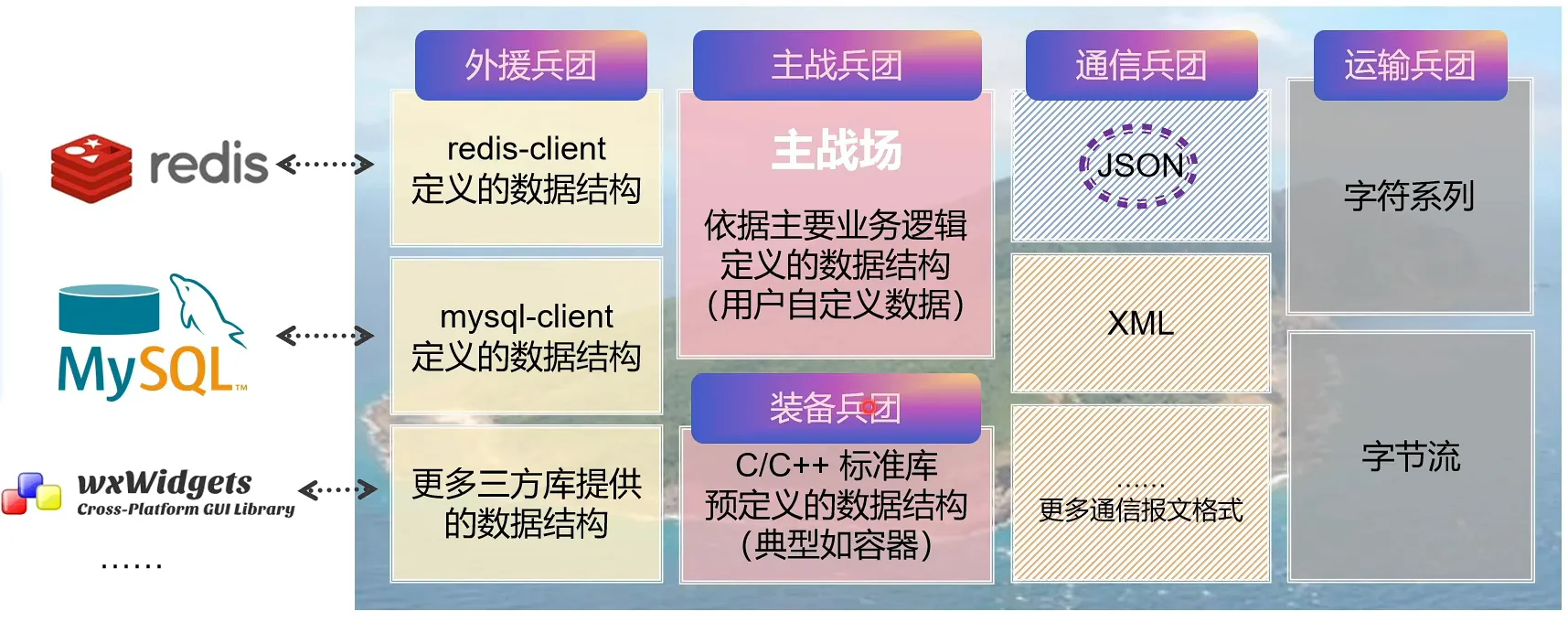
json数据在程序中通常作为信息传递的载体:
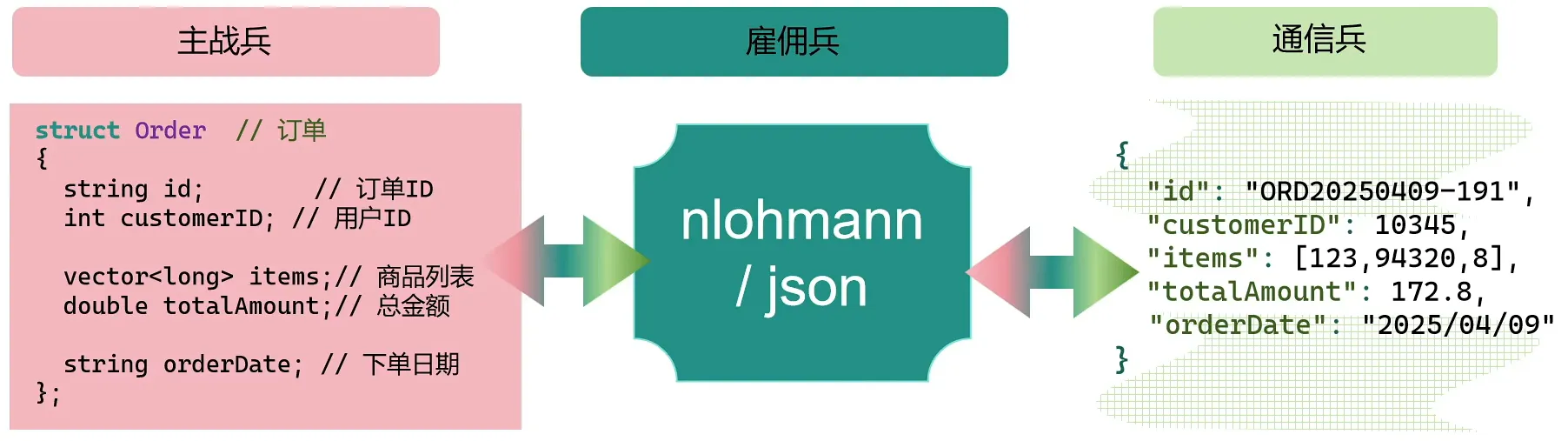
注意:
- c++内置类型体系与json的类型体系并非一一对应,json允许所有类型的字段都可以取值
null,如:布尔类型字段的合法值——c++:true/false;json:true/false/null; - json不保证字段次序(如有需要,可使用
order_json类。
1.json数据与c++数据的对比
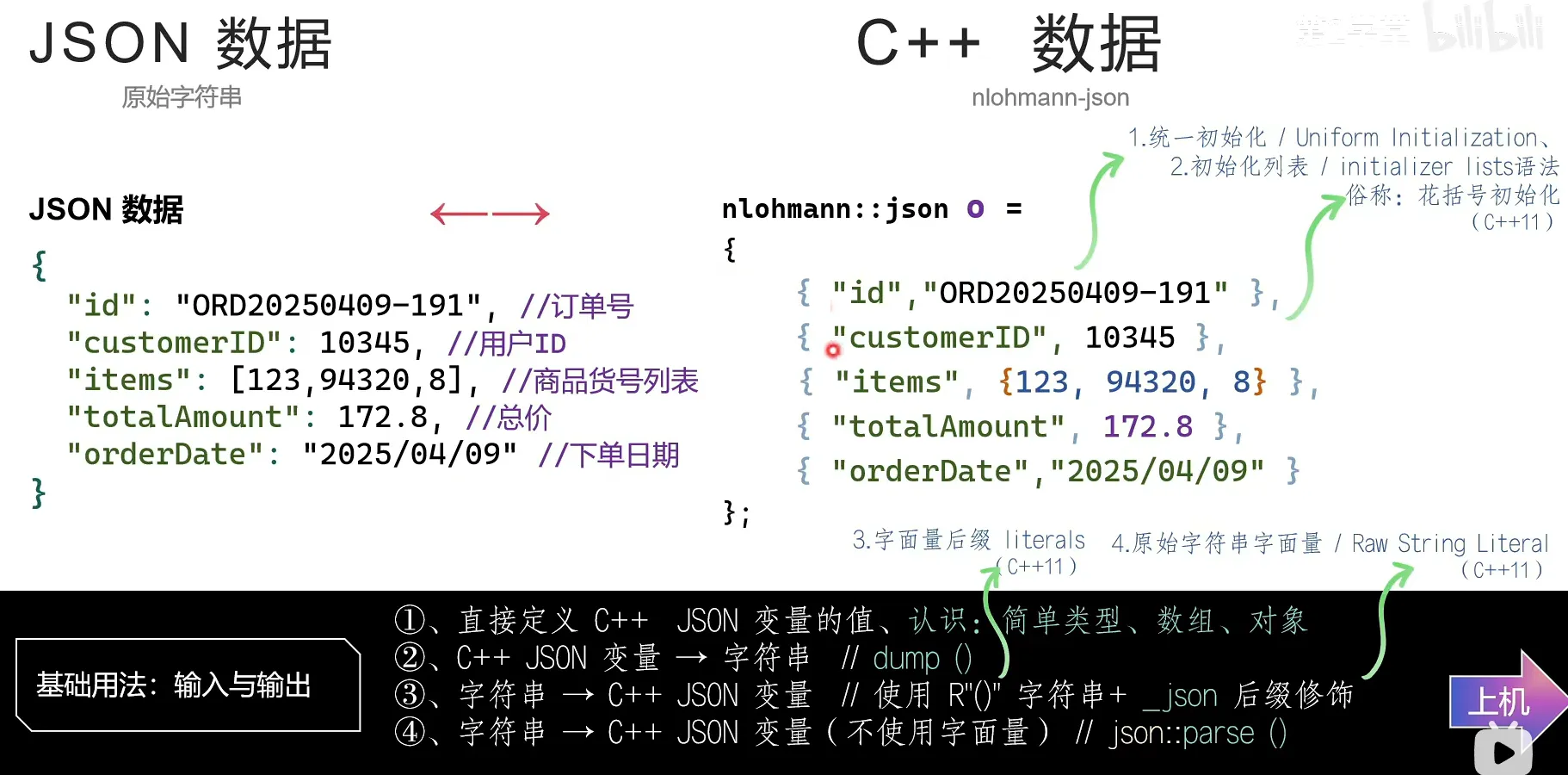
2.在c++中使用nlohmann解析json报文
常见的nlohmann代码结构:
#include <cassert>

#include <iostream>
#include <string>
#include <vector>

#include <nlohmann/json.hpp>

using json = nlohmann::json;
using namespace std::literals;
using namespace nlohmann::literals;//用于使用_json后缀

int main()
{
    //...
}
而将json解析为输出格式的语法为:
json j={...};
std::cout<<j.dump(2,' ')<<std::endl;//第一个参数表示缩进数,第二个参数表示缩进符,默认为空格
2.1方法1:使用键值对赋值
json o1 = {
    { "id", "ORD20250429-1919" },
    { "customerID", 10345 },
    { "items", { 123, 94320, 8 } },
    { "totalAmount", 172.8 },
    { "orderDate", "2025/04/09" }
};
要点:
- 统一初始化以及初始化列表语法;
- 字符串与数值类型的区分;
- 数组的表示。
2.2方法2:从字符串解析
json o3 = R"(
{
    "id":"ORD20250429-1919",
    "customerID":10345,
    "items":[123,94320,8],
    "totalAmount":172.8,
    "orderDate":"2025/04/09"
})"_json;
要点:
- 使用原始字符串语法
R"()"避免转义以及保留换行; - 使用
_json后缀解析。
2.3方法3:利用静态方法 json::parse()解析
该方法可以解析带注释的语句
std::string source = R"(
{
    "id":"ORD20250429-1919",//id
    "customerID":10345,//用户名
    "items":[123,94320,8],//商品
    "totalAmount":172.8,//总金额
    "orderDate":"2025/04/09"//下单日期
})";

//参数依次为:源json报文,回调,是否允许异常,是否忽略注释
json o2 = json::parse(source, nullptr, true, true);
二、基础方法
1.通过 []取值
std::cout << o1["id"] << std::endl;
std::cout << o1["customerID"] << std::endl;
std::cout << o1["items"] << std::endl;
std::cout << o1["totalAmount"] << std::endl;
std::cout << o1["orderDate"] << std::endl;
运行结果:
"ORD20250429-1919"
10345
[123,94320,8]
172.8
"2025/04/09"可以看到,输出的结果完全还原了json原始的值,需要注意,输出的值的类型并非与json中的值类型对应,即:o1["id"]的值并不是 string:
auto node = o1["id"];
std::cout << "Type: " << typeid(node).name() << std::endl;
结果:
Type: N8nlohmann16json_abi_v3_12_010basic_jsonISt3mapSt6vectorNSt7__cxx1112basic_stringIcSt11char_traitsIcESaIcEEEbxydSaNS0_14adl_serializerES3_IhSaIhEEvEE实际上,nlohmann库重载了以下函数:
std::ostream& operator<<(std::ostream& os, T const& item);其中 T就是我们用typeid得到的类型。因此,nlohmann/json的一个节点结构为“键+值”,但是,值的数据类型,并不是json报文对应字段的值类型。
2.类型的隐式转换和显示转换
2.1隐式转换
std::string id1 = o1["id"];
int customerID1 = o1["customerID"];
std::cout << "ID: " << id1 << std::endl;
std::cout << "Customer ID: " << customerID1 << std::endl;
输出内容:
ID: ORD20250429-1919
Customer ID: 10345
可以看到,相较于使用 []取值输出,id没有了双引号。
2.2显式转换
现代c++中,推荐显式转换,如需设置明确禁止隐式转换,可以设置宏:
#define JSON_USE_IMPLICIT_CONVERSIONS 0对于cmake项目,则需:
set(JSON_ImplicitConversions OFF)2.2.1 get<T>()
使用类方法将数据转换为指定类型的数据。
auto id2 = o1["id"].get<std::string>();
auto customerID2 = o1["customerID"].get<int>();
2.2.2 get_to<>()
使用类方法将数据转换为指定类型的数据,并存储至提前声明的变量中。
std::string id3;
o1["id"].get_to(id3);
std::cout << "ID: " << id3 << std::endl;
int customerID3;
o1["customerID"].get_to(customerID3);
std::cout << "Customer ID: " << customerID3 << std::endl;3.[]和 at()的区别
3.1使用 []访问节点
使用 [key]访问某个节点时,其行为与c++标准库的map<>(对象节点)和vector<>(数组节点)相似:
- 相同:访问不存在的key时,对象类型的节点,会自动生成一个空的子节点插入后并返回该子节点;
- 不同点:如果是
const对象,std::map对象无法执行[key]操作,而nlohmann允许——当key指定的字段不存在,debug版将直接退出程序,release版将返回一个null值(空节点),原则上,应视为“UB(未定义影响)”行为; - 特别地:在nlohmann中,如果将
[idx]用在数组节点上,而idx不存在(即越界访问)时,其行为完全等同于一个原生数组发生越界的效果:访问非法内存区域。
3.2使用 at()访问节点
使用 at(key)或 at(idx)访问节点,最大的区别是:指定节点不存在时,会抛出异常。
如果仅访问节点,推荐使用 at();如果需要插入新节点,推荐使用 []。
3.3其余查询方法
find(key):查找,返回一个迭代器contains(key):包含关系,返回boolean值size():获取元素个数
4.使用迭代器访问节点
//方法1
for (auto it = o.begin(); it != o.end(); ++it) {
    std::cout << it.key() << ": " << it.value() << std::endl;
}

//方法2
for(auto& it: o.items()){}

//方法3
for(auto v: o){cout << v << endl;}//只有字段本身(值),没有字段名

//方法4
for(auto& [k, v]: o.items()){}//since c++17
5.常用方法集
5.1转化
parse(InputType i...) -> jsondump() -> string/string_view/FILE*/istream
5.2访问获取节点
operator[key]at()get<T>() -> Tget_to<T>(T& var)
5.3查找
find(key) -> iteratorcontains(key) -> booeansize() -> size_t
5.4迭代器
begin()end()cbegin()cend()
5.5写入
operator[key]=valuepush_back(T const& var)- 数组:
push_back(v) - 对象:
push_back({k, v})
- 数组:
operator +=(T const& val)insert(iterator pos, T const& val):主要用于插入数组元素erase(iterator pos) -> iterator
5.6类型判别
is_boolean() -> boolis_string() -> boolis_number() -> boolis_number_xxx() -> boolis_null() -> boolis_array() -> boolis_object() -> booltype() -> json::value_ttype_name() ->string
其中,value_t 定义如下:
enum class value_t : std::uint8_t
{
    null,             ///< null value
    object,           ///< object (unordered set of name/value pairs)
    array,            ///< array (ordered collection of values)
    string,           ///< string value
    boolean,          ///< boolean value
    number_integer,   ///< number value (signed integer)
    number_unsigned,  ///< number value (unsigned integer)
    number_float,     ///< number value (floating-point)
    binary,           ///< binary array (ordered collection of bytes)
    discarded         ///< discarded by the parser callback function
};
5.7流
istream& operator>>(std::istream& i, json& j)ostream& operator<<(std::ostream& o, json& j)
输出格式设置:
setw(n):缩进setfill(char):填充字符
6.异常处理
6.1非法json报文
示例1
std::string s = "I love you.";
try {
    auto j = json::parse(s);
    std::cout << j.dump(4) << std::endl;
} catch (json::parse_error const& e) {
    std::cout << e.id << " -> " << e.what() << std::endl;
}
报错:
101 -> [json.exception.parse_error.101] parse error at line 1, column 1: syntax error while parsing value - invalid literal; last read: 'I'原因:
nlohmann 库的 parse() 函数期望接收符合 JSON 格式的字符串,但 “I love you.” 只是一个普通的文本字符串,不符合 JSON 语法规范。
修改:
// 方法一、正确的 JSON 字符串格式(注意双引号)
std::string s = "\"I love you.\"";

// 方法二、创建包含该字符串的 JSON 对象
std::string s = R"({"message": "I love you."})";

// 方法三、直接构造 JSON 对象(不使用 parse)
json j = "I love you.";
常见非法报文
123abc{"name":"Tom","age":20,}:未完结报文{"name":"张三","age":20}:非unicode报文
6.2越界访问(找不到指定字段)
略
6.3类型错误
采用与类型不匹配的操作
    json j = R"(
    {
        "item" : "class",
                 "id" : [ 1, 2, 3 ]
    }
)"_json;
    try {
        j.at("item").push_back(4);
        j.at("id").push_back('a');
    } catch (json::type_error const& e) {
        std::cout << e.id << " -> " << e.what() << std::endl;
    }
报错:
308 -> [json.exception.type_error.308] cannot use push_back() with string三、结构转换
1.手动转换
namespace wu {
struct Order {
    std::string id;
    int customerID;

    std::vector<long> items;
    double totalAmount;

    std::string orderDate;
};

/**
 * @brief Deserialize JSON to Order
 */
void from_json(const json& j, Order& o)
{
    j.at("id").get_to(o.id);
    j.at("customerID").get_to(o.customerID);
    j.at("items").get_to(o.items);
    j.at("totalAmount").get_to(o.totalAmount);
    j.at("orderDate").get_to(o.orderDate);
}

/**
 * @brief Serialize Order to JSON
 */
void to_json(json& j, const Order& o)
{
    j["id"] = o.id;
    j["customerID"] = o.customerID;
    j["items"] = o.items;
    j["totalAmount"] = o.totalAmount;
    j["orderDate"] = o.orderDate;
}
}

int main()
{
    json o1 = {
        { "id", "ORD20250429-1919" },
        { "customerID", 10345 },
        { "items", { 123, 94320, 8 } },
        { "totalAmount", 172.8 },
        { "orderDate", "2025/04/09" }
    };

    wu::Order o = o1;

    json jj = o;
}
2.自动转换
限制:c++中的成员数据名字和json字段名必须一致
2.1非侵入式 NLOHMANN_DEFINE_TYPE_NON_INTRUSIVE
要求:读取的字段都要是结构体中对外开放的对象(public)
namespace wu {
struct Order {
    std::string id;
    int customerID;

    std::vector<long> items;
    double totalAmount;

    std::string orderDate;
};

NLOHMANN_DEFINE_TYPE_NON_INTRUSIVE(
    Order,
    id,
    customerID,
    items,
    totalAmount,
    orderDate)
}
2.2侵入式 NLOHMANN_DEFINE_TYPE_INTRUSIVE
namespace MyBz {
class Address {
public:
    NLOHMANN_DEFINE_TYPE_INTRUSIVE(
        Address,
        street,
        housenumber,
        postcode)

private:
    std::string street;
    int housenumber;
    int postcode = 0;
};
} // namespace MyBz
2.3带默认值支持
当类成员中含有,而json对应的字段不存在时,默认的解析结果是失败。使用以下两个宏可以支持默认值解析,在json报文中不存在对应的字段时,类成员会按相应的默认值赋值。
//非侵入式
NLOHMANN_DEFINE_TYPE_NON_INTRUSIVE_WITH_DEFAULT()
//侵入式
NLOHMANN_DEFINE_TYPE_INTRUSIVE_WITH_DEFAULT()
2.4派生类
NLOHMANN_DEFINE_DERIVED_TYPE_NON_INTRUSIVE(类,基类,成员)
NLOHMANN_DEFINE_DERIVED_TYPE_INTRUSIVE(类,基类,成员)
2.5派生类且支持默认值
NLOHMANN_DEFINE_DERIVED_TYPE_NON_INTRUSIVE_WITH_DEFAULT(类,基类,成员)
NLOHMANN_DEFINE_DERIVED_TYPE_INTRUSIVE_WITH_DEFAULT(类,基类,成员)
2.6组合
只要组合的类型支持json互换,则组合类型也支持json互换。
class Person {
public:
    NLOHMANN_DEFINE_TYPE_INTRUSIVE_WITH_DEFAULT(
        Person,
        name,
        age,
        address)
private:
    std::string name;
    int age = 0;
    std::string address;
};

class Class {
public:
    NLOHMANN_DEFINE_TYPE_INTRUSIVE(Class, classmate, numbers)
private:
    Person classmate;
    int numbers;
};

int main()
{
    json j = R"(
{
"classmate":{
    "name":"wdj",
    "age":18,
    "address":"beijing"
    },
"numbers":1
}
)"_json;

    Class c = j;

    std::cout << j.dump(4) << std::endl;
}
2.7枚举类型支持 NLOHMANN_JSON_SERIALIZE_ENUM
- 手工实现;
- 使用整数存取枚举值——高效,只是阅读体验不好;
- 希望输出字符串,读入时转换为枚举——使用
NLOHMANN_JSON_SERIALIZE_ENUM宏
//定义枚举
enum class OrderStatus {
    Pending,
    Shipped,
    Paied,
    Canceled
};

//定义枚举与字符串的映射关系
NLOHMANN_JSON_SERIALIZE_ENUM(
    OrderStatus,
    { { OrderStatus::Pending, "Pending" },
        { OrderStatus::Shipped, "Shipped" },
        { OrderStatus::Paied, "Paied" },
        { OrderStatus::Canceled, "Canceled" } })

//使用
auto str<<json(OrderStatus::Pending).get<string>();
auto stu=json("Pending").get<OrderStatus>();